Why connect AirScout to the chat client?
An aircraft-scatter opportunity is useful for a limited time. AirScout can calculate the path and identify suitable aircraft, but it does not know which of the many stations in the ON4KST chat currently matters to the operator.
KST4Contest provides this missing context. It sends relevant active stations to AirScout and assigns the returned aircraft information to the corresponding chat members.
The responsibilities remain separate:
- AirScout obtains the aircraft data and evaluates the reflection geometry.
- KST4Contest selects the station paths to request.
- KST4Contest relates the returned timing to messages, candidate priorities and skeds.
KST4Contest does not download ADS-B data and does not calculate the aircraft geometry itself.
Which stations are sent to AirScout?
KST4Contest updates the AirScout requests every 60 seconds. A station is included only if:
- AirScout communication is enabled;
- the station has a usable callsign and locator;
- its distance is known;
- its QRB is below the configured maximum QRB; and
- a usable propagation band can be determined.
Active chat variants of the same base callsign are combined for the frequency decision. The path itself is requested once instead of sending duplicate calculations for every visible suffix or chat-category entry.
KST4Contest also updates the AirScout watchlist. Stations which are no longer active or no longer meet the conditions are therefore not intended to remain permanent watchlist targets.
How is the AirScout band selected?
Automatic station-specific band selection is included from v1.42 onwards. A fixed configured AirScout band remains available as a manual fallback.
In Auto per station mode, KST4Contest uses the same propagation-frequency resolver as the internal path analysis. The sources are evaluated in the following order:
- the most recently detected QRG of the station;
- a band explicitly stated in the name of one of its active chat entries;
- 432 MHz when the station is present in both the VHF/UHF and microwave categories and 432 MHz is enabled locally;
- the lowest locally enabled fallback band belonging to the supported chat category.
Only bands enabled for the local station are eligible. A manual NOT-QRV mark removes the corresponding band before the selection is made.
Recent detected frequencies are preferred because the path should normally be evaluated for the band on which the contact is actually intended. A category alone is weaker evidence: it describes a range of possible activity, not necessarily the current operating band of one station.
Unsupported ON4KST categories are ignored. They must not silently turn into a 144 MHz request merely because no better information is available.
If no usable result remains, KST4Contest omits the AirScout request for that station.
What does AirScout return?
AirScout replies with the aircraft currently considered relevant for the requested path. For each aircraft, KST4Contest receives information including:
- the aircraft identifier;
- the AirScout size category;
- the distance to the expected reflection point;
- the potential reported by AirScout; and
- the remaining time until the expected arrival.
The aircraft are ordered by their reported potential and, where this is equal, by arrival time.
The result is assigned to every active chat variant of the corresponding base callsign. A station logged in as CALLSIGN, CALLSIGN-2 or CALLSIGN-432 therefore receives the same path information without merging the individual message targets.
How does the result affect KST4Contest?
AirScout information is used in several places:
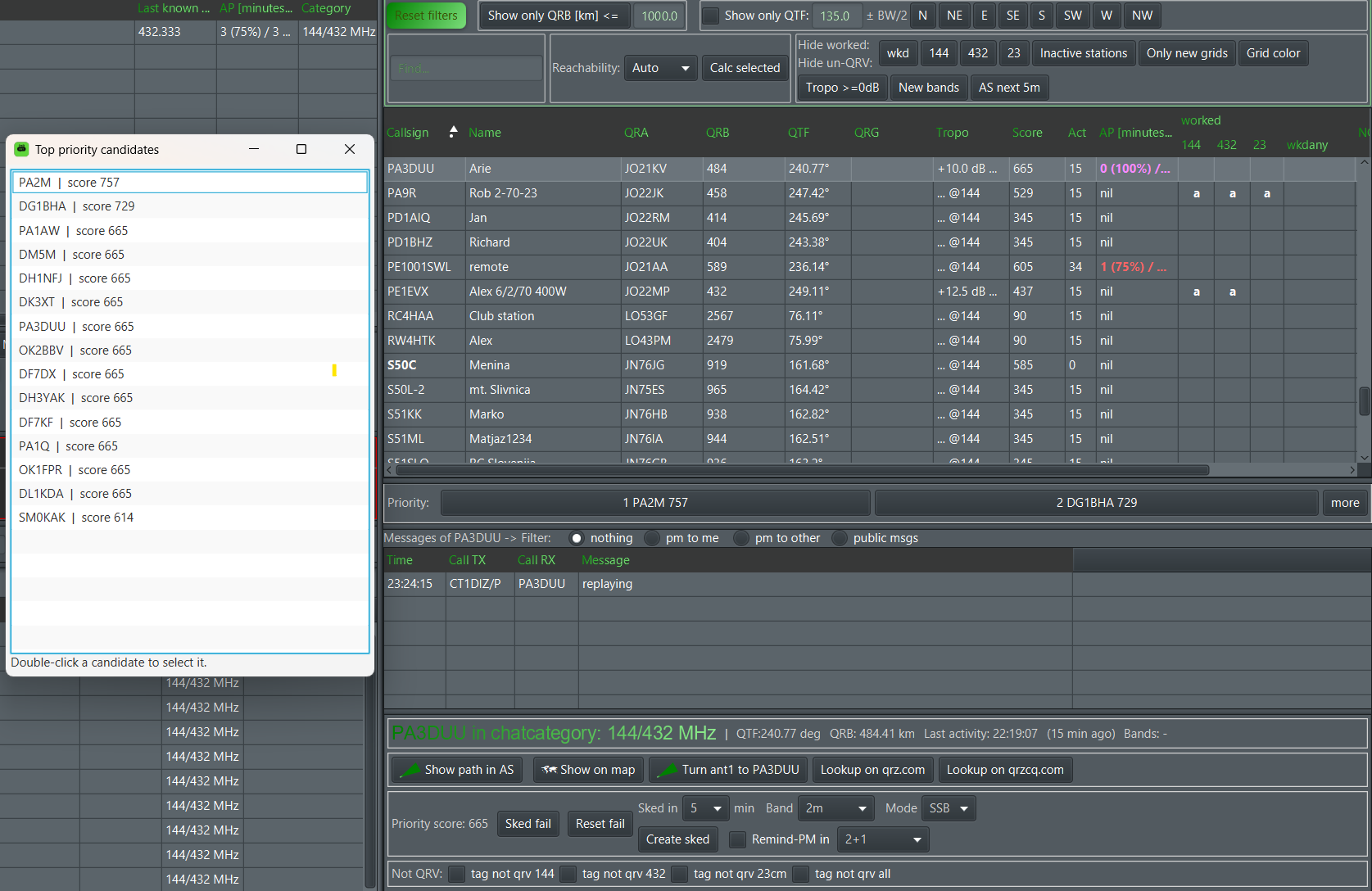
- The AP column shows the next available aircraft for a station.
- The Further Info section provides the aircraft information for the selected station.
- AP candidates can appear on the 30-minute timeline.
- A station with available aircraft receives an additional Priority Score contribution.
- An aircraft expected within the next few minutes raises the score further.
- The
FIRSTAPandSECONDAPvariables can insert the information into a message.
The percentage reported by AirScout is not interpreted as a contact probability. In particular, a displayed value of 100% does not mean that a QSO will succeed.

Priority and timing are separate questions
The Priority Score currently considers whether AirScout has reported usable aircraft and how soon the earliest aircraft is expected. The detailed potential value is used for the AP display and the timeline colour, but it is not converted directly into a percentage-based score.
This distinction is intentional. The AirScout value describes the aircraft geometry known to AirScout. The complete contest decision also depends on the band, antenna direction, activity of the remote station, Worked state and any existing sked.
In plain terms: an aircraft may make the path interesting. It does not make the remote station ready.
Show the selected path in AirScout
The direction button of the selected station can send an ASSHOWPATH request to AirScout. AirScout then opens or updates the corresponding path display.
The request uses:
- the configured AirScout server identifier;
- the configured KST4Contest client identifier;
- the selected propagation frequency;
- the local callsign and locator; and
- the complete callsign and locator of the selected station.
The local ON4KST suffix is removed before the path request because AirScout expects the actual station callsign rather than a chat-specific login suffix.
If the selected station has no usable locator or no propagation frequency can be determined, the request is omitted. Opening an impressive empty AirScout window would not add much information.
Several clients in the same network
The default identifiers are:
| Setting | Default |
|---|---|
| AirScout server identifier | AS |
| KST4Contest client identifier | KST |
| UDP port | 9872 |
The server and client identifiers are configurable. This matters when several KST4Contest or AirScout instances are operated in the same station network.
Each KST4Contest instance should use a distinct client identifier. Incoming AirScout replies are accepted only when the server and client identifiers exactly match the configured values. The comparison is case-sensitive.
This keeps a reply for one operating position from being assigned to another client merely because both listen on the same UDP network.
Strict reply filtering by the configured client/server pair is included from v1.42 onwards.
AP variables in messages
The selected station can be referenced through two message variables:
| Variable | Result |
|---|---|
FIRSTAP |
Description and arrival time of the first aircraft |
SECONDAP |
Description and arrival time of the second aircraft |
If no aircraft is available, FIRSTAP returns no ap available. If no second aircraft exists, SECONDAP is replaced with an empty string.
The absence of a second aircraft is a normal result and does not prevent editing or sending the message.
What the integration cannot guarantee
The result depends on several external and derived inputs:
- the aircraft data available to AirScout;
- the AirScout configuration and calculation;
- the locator assigned to the remote station;
- the band or frequency selected by KST4Contest;
- the age of detected QRG information; and
- the actual operating situation at the remote station.
A missing aircraft in KST4Contest does not prove that the path is unusable. It may also mean that AirScout returned no matching result, the station was outside the configured QRB range, the locator was missing or no suitable band could be derived.
Conversely, a reported aircraft does not guarantee sufficient signal strength or a completed contact.
Read the complete AirScout setup in the manual.
Read how the AP information affects the timeline.
Open the AirScout project on GitHub.