Why combine station filters?
A busy ON4KST category can contain far more stations than are relevant to the current antenna direction, band or operating moment. One filter rarely describes the complete situation.
KST4Contest therefore allows spatial, operating and propagation-related conditions to be active at the same time. The purpose is not to discard stations. It is to reduce the visible worklist to the contacts which currently deserve attention.
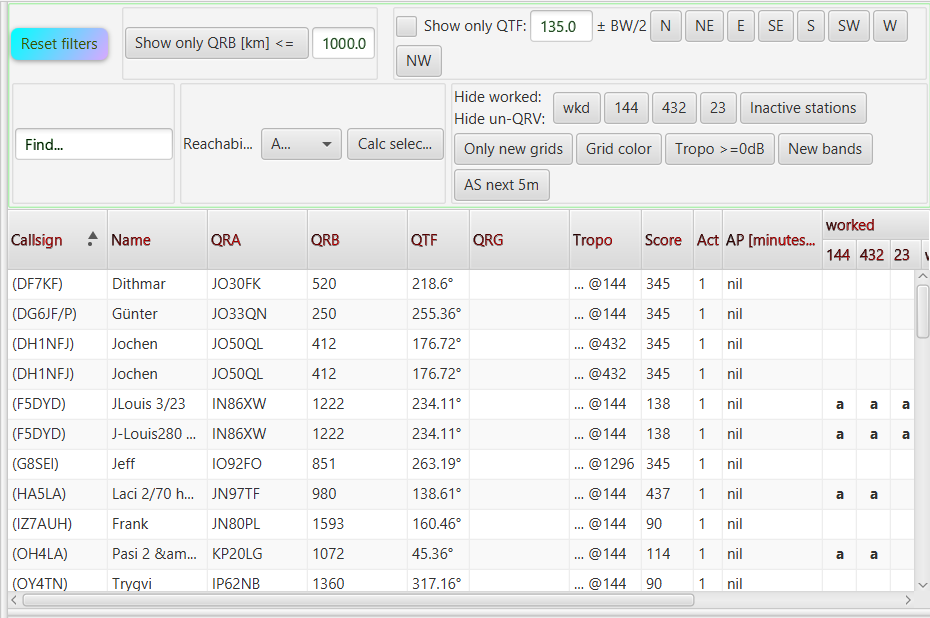
Three kinds of filter
Spatial filters
- Show only QTF keeps stations inside the selected antenna direction and configured beamwidth.
- Show only QRB [km] <= limits the list to the entered distance.
- Show only QRB [km] > hides stations up to the entered distance; with both on, the list shows a distance range.
Operating filters
- Find matches a complete or partial callsign.
- wkd hides base callsigns already worked on at least one supported band.
- The individual band buttons hide stations already worked or marked NOT QRV on that band.
- Inactive stations removes stations whose latest chat activity is too old.
- Only new grids retains stations in four-character grid squares not yet worked.
- New bands retains stations with at least one known, locally enabled and unworked band opportunity.
Propagation-related filters
- Tropo >=0dB uses the available path-assessment result.
- AS next 5m retains stations with a current AirScout opportunity or one expected within the next five minutes.
These groups describe the operator's question, not separate processing stages. Every active filter is applied to the same station view.
Active filters use AND logic
Several enabled filters are combined with AND. A station remains visible only when it satisfies every active condition.
For example, the operator can combine:
- a QTF sector;
- a maximum QRB;
- New bands; and
- AS next 5m.
The result contains only stations which lie in the chosen direction and distance, still offer a common unworked band and have a suitable AirScout window within the next five minutes.
This is deliberately strict. Adding another filter narrows the result; it does not add a second independent group of candidates.
User list and map share the result
The user list and Station Map use the same filtered station set. If a station disappears from the table because of QTF, QRB, Worked, band or propagation criteria, it also disappears from the geographical view.
This makes the map useful as a spatial worklist rather than a second list with different rules.
Hidden does not mean deleted
A filtered-out station remains in the active station model and continues to participate in chat processing. Incoming messages, QRG and band updates, Worked changes and other state can therefore make it relevant again.
The Priority List is intentionally independent of the table filters. A high-priority candidate may still appear there while its row is hidden in the user list. Selecting that candidate updates the current station and Further Info, but does not silently disable the active filters.
Grid color and Reachability are not filters
Grid color changes only the appearance of the QRA cell for an already worked four-character grid square. It does not remove a station and remains enabled when Reset filters is used.
The Reachability selector determines the band used for the Tropo column, the Tropo filter and an explicitly requested path calculation. Selecting a band does not itself filter the list. The choice is therefore also retained by Reset filters.
Unknown Tropo results remain visible
Tropo >=0dB removes only stations for which a completed calculation returned a negative SSB margin.
Stations with a pending, missing or failed result remain visible. Missing data is not evidence that a path is unsuitable. Treating every absent online result as a negative path assessment would make the filter look decisive while merely hiding uncertainty.
Filters react to new information
The visible result changes when relevant station data changes. A new log entry can remove a station through the Worked filter. A detected QRG may create a Band Recognition result for New bands. New AirScout information can make a station pass AS next 5m.
In practical terms: the filter bar turns the current station model into a temporary operating view. It does not create a smaller, disconnected copy of the contest.
Read the complete filter and Reachability controls in the manual.
Read how Worked and band information changes through log synchronisation.