Why does the moment after a QSO matter?
Finding a station, turning the antenna, agreeing on a frequency and completing the QSO takes time. Once that contact is in the log, much of the difficult work has already been done.
The first QSO has already demonstrated a usable path, correct antenna direction and an available operator. BAND+ therefore appears immediately after logging when another common, unworked band is known, so the station can be moved before that operating context is lost. It does not guarantee the next band, but it identifies the best moment to try it.
This sequence is the useful part: KST4Contest first recognises possible bands, compares them with the local station and the log, and then presents the remaining opportunity while both operators are still in contact.
How are active bands recognised?
KST4Contest combines information which may be distributed across several chat entries:
- QRGs detected for the remote station;
- explicit band designators in its name fields; and
- active callsign variants belonging to the same normalised base callsign.
A recent QRG is stronger evidence than a general chat category. Active variants are evaluated together because a station may use separate suffixes or logins for different bands. The individual variants nevertheless remain separate message targets in their respective chat categories.
When does a detected band become an opportunity?
Recognition alone is not enough. KST4Contest compares the detected bands with:
- the bands enabled for the local station;
- stored Worked information for each band; and
- manually assigned NOT-QRV marks.
Only a locally enabled, common and unworked band remains an open opportunity. A manual NOT-QRV mark takes precedence over a detected QRG, name field or callsign variant.
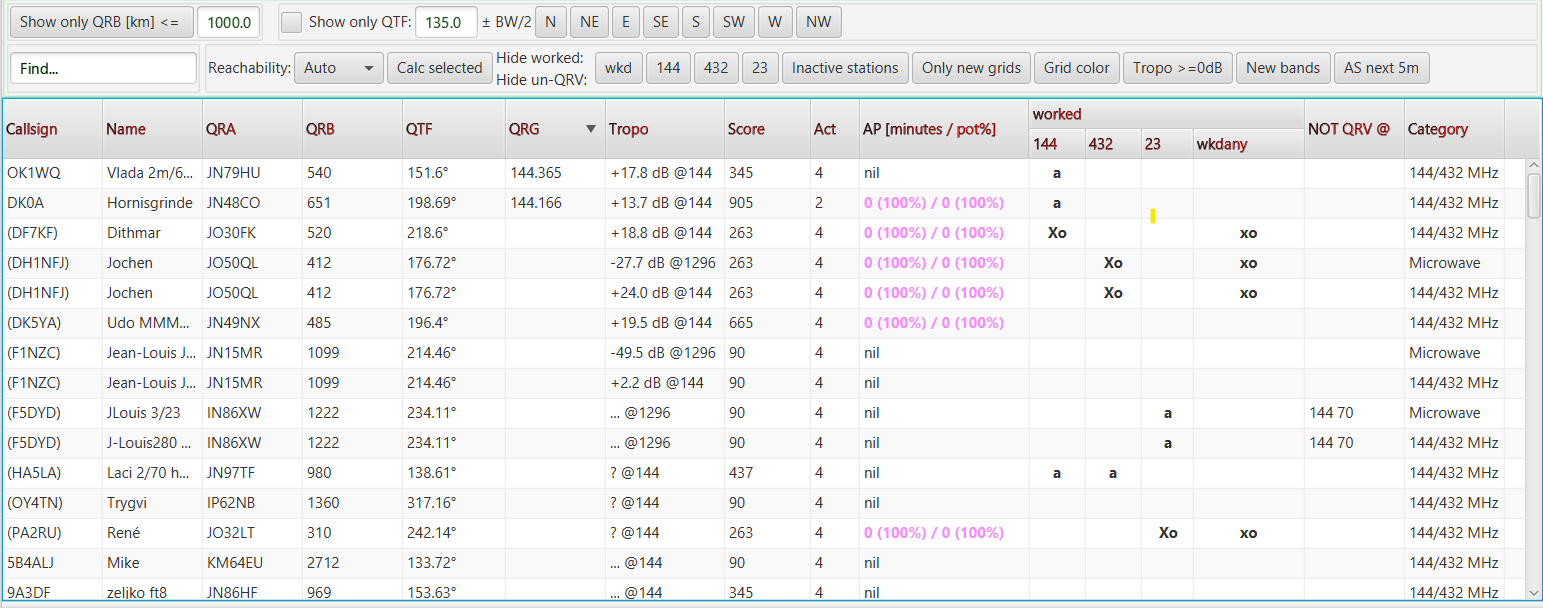
The comparison remains band-specific. Working a station on 144 MHz does not mark it as worked on 432 MHz, and a NOT-QRV mark for one band does not remove a different band opportunity.
Where is the result used?
The same derived information supports several parts of the contest workflow:
adistinguishes an offered, unworked band for a callsign which has not yet been worked;B+marks another offered, unworked band after the callsign has already been worked elsewhere; if the separateadisplay is disabled, it also represents this opportunity for a completely new callsign;- New bands filters the user list for stations with at least one detected opportunity;
- the Priority Score uses known band compatibility and open band-upgrade cases;
- map markers include derived bands and open
B+opportunities; and BAND+reports the remaining bands immediately after a suitable QSO is logged.
These are not separate guesses. They use the same band, Worked and NOT-QRV context for different operating decisions.
The immediate BAND+ hint
When UCXLog or Win-Test reports a new QSO with band information, KST4Contest checks the station again. If another common and unworked band remains, a blinking hint appears for approximately twelve seconds, for example:
BAND+ DL0ABC 432, 1296
The tooltip shows the enabled, worked and NOT-QRV bands behind the decision. If general notification sounds are enabled, a short sound accompanies the hint.
The file-based Simplelogfile interpreter cannot trigger this hint reliably because it supplies the callsign but not the band of the newly logged QSO.
Recognition is evidence, not a promise
A detected QRG, name-field entry or active callsign variant indicates possible activity. It is not proof that the station is currently ready on that band, that propagation will hold or that the next QSO will succeed.
The reverse is equally important: unknown does not mean impossible. If KST4Contest has no band information for a station, it cannot present a known opportunity, but the missing information does not prove that no common band exists.
In practical terms: band recognition reduces the time between noticing an opportunity and asking for the next band. The decision to try it still belongs to the operator.
Read how Worked, band and NOT-QRV information is derived in the manual.
Open the BAND+ and Priority Boost settings.