Why synchronise the local QRG?
Changing frequency in the logger and then copying the same value into the chat client is easy to forget. The result may be a perfectly valid beacon or QRG reply which points to yesterday's frequency.
KST4Contest can therefore update the primary local QRG, MYQRG, from the logger. The current value is then available immediately wherever the application's own QRG is required.
TRX/QRG Synchronisation has existed since version 1.0. Support for native Win-Test STATUS packets is included from version 1.31 onwards.
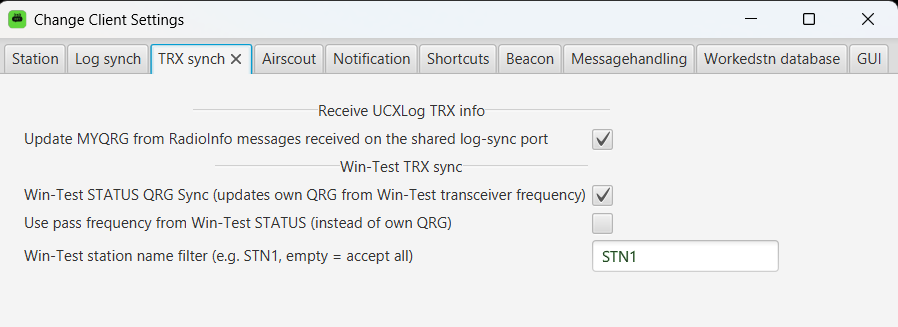
Which sources can update MYQRG?
Two automatic sources are available:
- compatible
RadioInfopackets received through the shared log-sync UDP listener; and - native Win-Test
STATUSpackets received through the Win-Test network listener.
If neither source is enabled, MYQRG can be entered manually in the main window. Enabling an automatic source makes the received value the primary QRG instead.
Frequency and QSO synchronisation are separate
The general UDP listener may receive QSO data and RadioInfo packets on the same port, but KST4Contest treats them as different functions.
A RadioInfo packet can update MYQRG; it does not mark a station as worked. Conversely, QSO or Worked synchronisation updates the log-derived station state without automatically changing the local QRG.
This separation is deliberate. A radio frequency says where the local station is operating. It says nothing about which remote station has just been worked.
MYQRG does not mean SECONDQRG
Both automatic sources update MYQRG only. This is the local QRG of the first or primary chat category.
SECONDQRG remains independent and is not derived from incoming TRX packets. A dual-chat setup can therefore follow the logger automatically for the primary category while retaining a separately entered QRG for the second category.
Main or pass frequency from Win-Test
By default, KST4Contest uses the main frequency from a Win-Test STATUS packet. It can instead be configured to use the pass frequency.
If the pass value is missing or invalid, KST4Contest falls back to the main frequency. An unusable pass value therefore does not clear MYQRG or replace it with an invalid frequency.
Several Win-Test operating positions may transmit STATUS packets on the same network. The configured station-name filter accepts QRG updates only from the intended position. This prevents another operating position from taking over the local frequency merely because its packet arrived later.
What happens with several frequency sources?
All enabled sources write to the same MYQRG value. KST4Contest does not assign a fixed priority to RadioInfo and Win-Test STATUS packets.
If several sources are active, the most recently processed packet determines the current primary QRG. That is useful when the sources describe the same radio. Independent radios should not compete for the same value unless that last-packet behaviour is actually intended.
Where is the synchronised QRG used?
The current primary QRG is immediately available for:
- macros and variables, including
MYQRGandMYQRGSHORT; - automatic beacons;
- automatic QRG replies in the primary chat category; and
- a matching primary local-frequency fallback when a sked is handed to Win-Test.
The sked handover still checks whether the local QRG belongs to the selected band. Synchronisation supplies the value; it does not bypass that validation.
What the function does not do
TRX/QRG Synchronisation tracks the local station's primary frequency. It does not detect the QRG of a remote station from chat text; that is the separate Automatic QRG Detection function.
It also does not turn a RadioInfo packet into a logged QSO. Worked information remains the responsibility of Log Synchronisation.
In practical terms: one current local QRG can feed several operating workflows, but it remains one value. SECONDQRG, remote-station frequencies and Worked state keep their own meanings.
Read the complete TRX Sync configuration in the manual.