Three different mechanisms
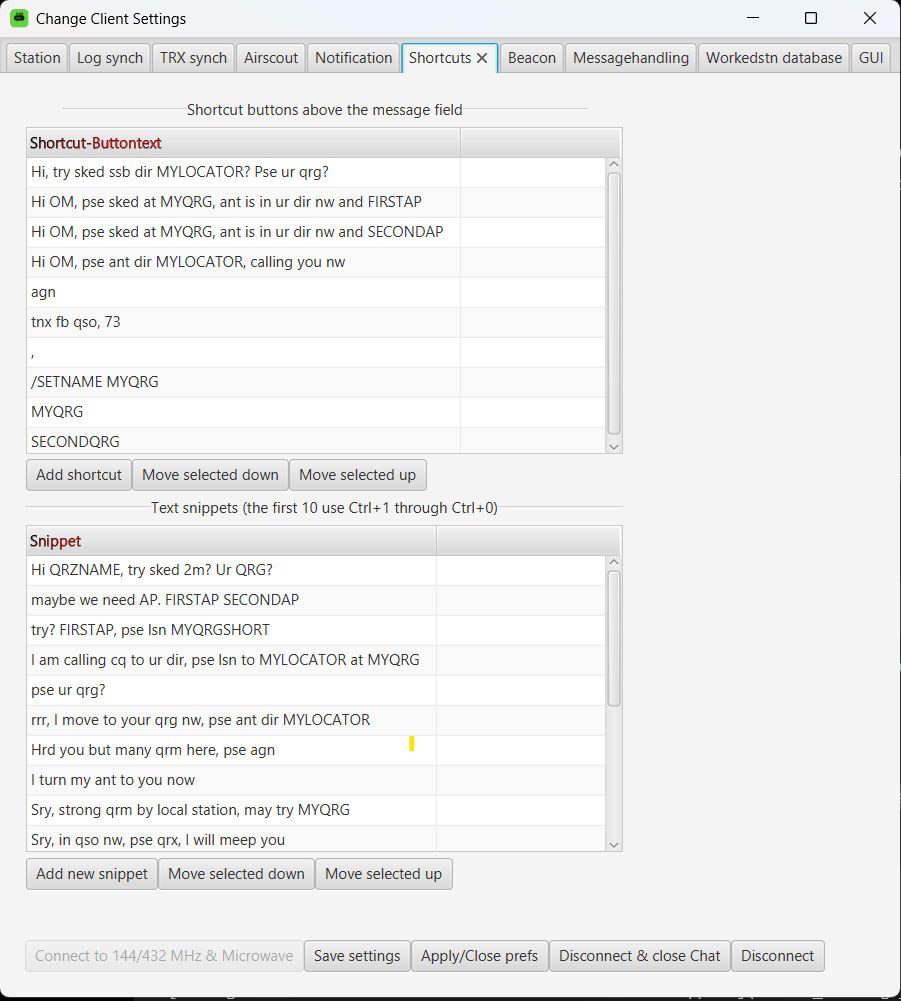
KST4Contest uses three related but distinct mechanisms:
| Mechanism | Purpose |
|---|---|
| Shortcut | Inserts a configured text through a button in the main window |
| Snippet | Prepares or extends a message for the selected station |
| Variable | Replaces a reserved placeholder with current operating information |
Shortcuts and snippets store text. Variables add values which may change while the program is running.
This distinction matters. A shortcut such as pse sked? always inserts the same text. A shortcut containing MYQRG inserts the QRG which is current when the shortcut is used.
Shortcut buttons
Each entry configured under Shortcut Settings creates a button in the main window.
Pressing the button appends its text to the send field. Variables contained in the shortcut are resolved against the current station and operating context.
Typical shortcuts are:
pse sked?
rrr
tnx
pse call me at MYQRGSHORT
/SETNAME MYQRG
Shortcuts are useful for short expressions which are required frequently and are not necessarily addressed to a particular station.
The exact entries MYQRG and SECONDQRG are recognised as frequency buttons and insert the corresponding current QRG.
The shortcut /SETNAME MYQRG is highlighted as well. It resolves the current primary QRG and prepares the complete server command in the send field. The command is not transmitted automatically and remains available for review.
Text snippets
Snippets are longer text blocks intended primarily for communication with a selected station.
They are available through:
- the context menu of the user list;
- the context menus of the public and private message tables; and
Ctrl+1throughCtrl+0for the first ten configured snippets.
When a station is selected, a keyboard snippet prepares a directed message using the complete visible callsign:
/cq CALLSIGN snippet text
A suffixed callsign such as 9A0BB-70 remains 9A0BB-70. Its chat category is retained for the later transmission, so the snippet is not accidentally sent through the other active category.
The prepared message is not sent automatically. It remains in the send field and can be checked or edited before pressing Enter or TX.
When are variables resolved?
Variables inserted through a shortcut or snippet are resolved when that text is inserted.
Variables typed or pasted directly into the send field are resolved immediately before the message is placed in the transmission queue. This provides a second controlled resolution point and ensures that manually entered variables work as well.
Station-specific variables always refer to the currently selected station. They are not derived from a callsign which was typed manually somewhere inside the message.
Variable names are case-sensitive and must be written in uppercase.
Global variables
Global variables depend only on the local station and its current configuration.
| Variable | Replacement |
|---|---|
MYQRG |
Current QRG of the primary chat category |
MYQRGSHORT |
First seven characters of the primary QRG |
SECONDQRG |
Current QRG of the second chat category |
MYLOCATOR |
Complete configured locator of the local station |
MYLOCATORSHORT |
First four characters of the local locator |
MYCALL |
Configured local login callsign |
MYQTF |
Current antenna heading in degrees |
Example:
cq at MYQRGSHORT, qtf MYQTF, loc MYLOCATOR
may become:
cq at 144.388, qtf 135, loc JO51IJ
MYQRG always refers to the primary category and SECONDQRG always refers to the second category. Their meaning does not change merely because a station from the other chat category is selected.
The QRG values may originate from logger synchronisation or from the corresponding manually editable QRG fields.
MYQTF is a numeric heading. It is not converted into words such as north or south-west.
Variables requiring a selected station
The following variables use information belonging to the selected remote station:
| Variable | Replacement |
|---|---|
QRZNAME |
Name shown for the selected station, or its complete callsign if no name is available |
FIRSTAP |
Description and arrival time of the first AirScout aircraft |
SECONDAP |
Description and arrival time of the second AirScout aircraft |
Example:
Hi QRZNAME, FIRSTAP, pse lsn at MYQRGSHORT
may become:
Hi David, a very big AP in 2 min, pse lsn at 144.388
If AirScout reports no aircraft for the selected station, FIRSTAP becomes:
no ap available
If no second aircraft is available, SECONDAP becomes an empty string.
When no station is selected, QRZNAME, FIRSTAP and SECONDAP remain visible in the text. They are deliberately not removed, because an unresolved placeholder is easier to notice than a plausible-looking but incomplete message.
Select the intended station before using these variables and check that no unresolved placeholder remains before sending.
Variables in automatic beacons
A public beacon has no selected remote station. It can therefore use only global variables:
MYQRGMYQRGSHORTSECONDQRGMYLOCATORMYLOCATORSHORTMYCALLMYQTF
QRZNAME, FIRSTAP and SECONDAP must not be used in a beacon.
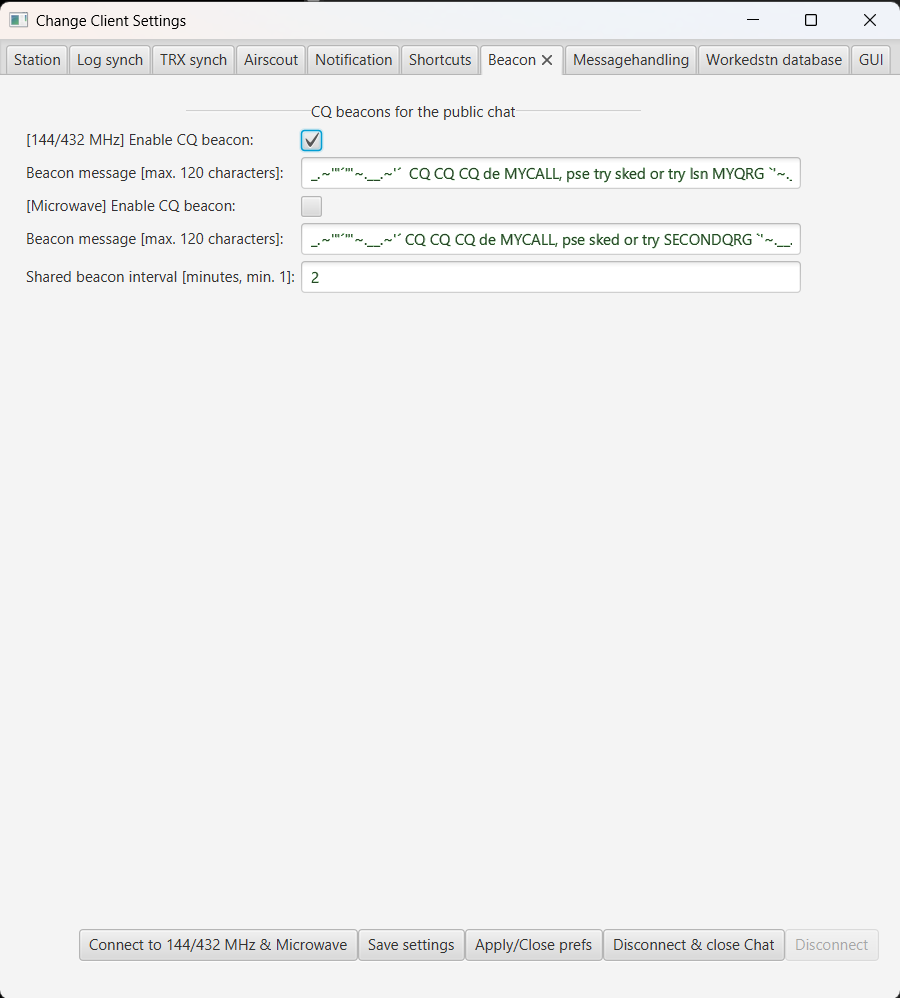
Each chat category has its own enable setting and message template. Both categories use the same timer interval. The second beacon is sent only when the second category and its beacon are enabled in the shared ON4KST session.
Global variables are evaluated again on every timer run. A QRG changed by the logger can therefore be included in the next beacon without editing its template.
The completely resolved beacon text must not exceed 120 characters. The configured minimum interval is one minute.
A suitable template is:
cq at MYQRGSHORT, qtf MYQTF, loc MYLOCATOR
For the second category, use SECONDQRG if that category operates on a different QRG.
Practical workflow
A typical sequence is:
- Select the intended station.
- Press
Ctrl+1to prepare a directed snippet. - Check the complete callsign and the resolved values.
- Adjust the message if the station proposed another QRG.
- Press
Enteror TX.
For example, the configured snippet:
Hi QRZNAME, pse sked? I call at MYQRGSHORT
can produce:
/cq DL1ABC-432 Hi Peter, pse sked? I call at 432.088
The complete callsign identifies the message destination. The current QRG and station name reduce repetitive typing but do not decide whether the information is still operationally correct.
Operational limitations
Variables reproduce the information currently known to KST4Contest. They do not verify that it is still correct.
In particular:
- a logger-supplied QRG may already have changed;
- a manually entered QRG remains in use until it is changed again;
- the selected station may differ from a manually typed
/cqtarget; - AirScout may have no current aircraft information; and
- an unresolved station variable remains visible when no station is selected.
The send field therefore remains editable after inserting a shortcut or snippet.
In plain terms: the variables remove repeated typing. The operator still checks the message.
Read the complete macro and variable reference in the manual.
Open the shortcut and snippet configuration.
Read how the AirScout values are obtained.