Why connect the rotator to the chat client?
A station selected in the chat already has a locator and a calculated QTF. Entering the same direction manually into another application adds another small task at precisely the point where the operator is preparing a contact.
KST4Contest can send that direction directly to PSTRotator.
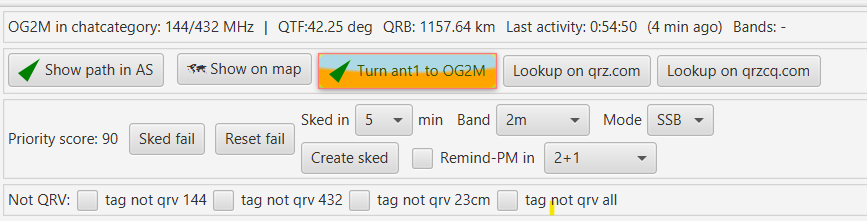
Sending a direction
Press Turn ant1 to … in the Further Info section of the selected station.
KST4Contest:
- calculates the azimuth from both station locators;
- disables PSTRotator tracking mode;
- sends the target as an integer azimuth; and
- receives the current position reported by PSTRotator.
The function uses UDP. PSTRotator receives commands on the configured control port and reports its position on the following port.
With the default control port 12000, KST4Contest therefore listens on 12001.
One position, several consumers
The reported azimuth becomes the current QTF in KST4Contest. The value is subsequently used by:
- the direction filter;
- direction-opportunity detection;
- the Priority Score;
- the antenna sector on the map;
- the AP and sked timeline; and
- the
MYQTFmessage variable.
This shared use is intentional. The antenna should not be shown pointing in one direction while the filters and candidate calculations continue to assume another.
SPID compatibility check
Some SPID configurations occasionally fail to react to the first direction command.
KST4Contest checks the reported position after two seconds. If no movement was reported and the target has not been reached, it sends one compatibility sequence through 0° and then repeats the intended target.
The check runs in the background and does not block the user interface.
Limits of the integration
The current interface controls and evaluates azimuth only. It does not provide elevation tracking.
The reported QTF describes what PSTRotator returns. Whether the antenna mechanically reaches that exact position still depends on the rotor, controller, calibration and configured offsets.
UDP also provides no delivery confirmation. Correct host, port, return port and firewall settings remain necessary.
In plain terms: KST4Contest removes the repeated transfer of a direction from one window to another. It does not turn an uncalibrated rotor into a calibrated one.
Read the complete setup and port assignment in the manual.